


Class Cancellation & Replacement System
- Term students can cancel a class online up to 1 hour in advance to receive a credit.
- A credit gives the possibility, but not the right, to take a class from another course before the term's end depending on space availability.
- All credits return to "0" at term's end and cannot be used in a following term.
- You can use a credit earlier than the canceled class. To replace the last class of a term, cancel it and use the credit in advance. Otherwise, it is lost.
How to Cancel
After you have paid:
- Log in.
- Click or tap My Registrations ▽ , then click or tap the link to your course.
- Scroll below the calendar of your course page...
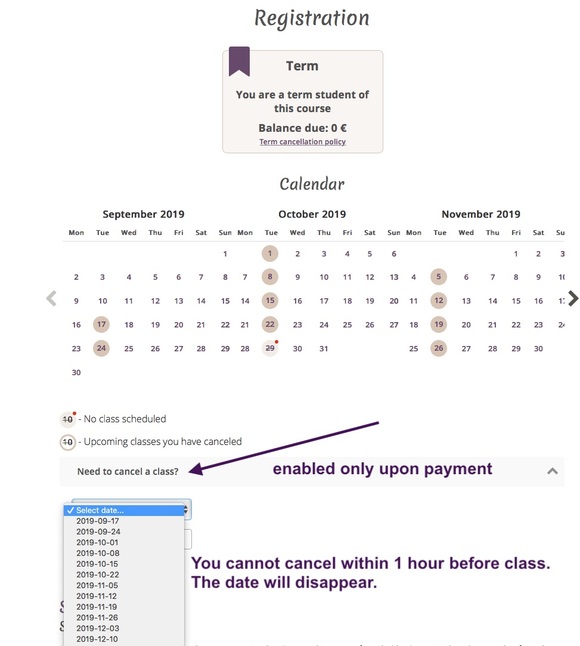
1 credit will be added in your My Registrations ▽ section.
If you canceled a class but later can attend, click "undo cancellation" in My Registrations ▽ . This "undo" link disappears if someone has taken your place.
How to Use a Credit
With credits, register with the "replacement class" system within 48 hours of class time.
Expand My Registrations ▽ and click the ≡ Replacement Classes button for "Available Replacement Classes".
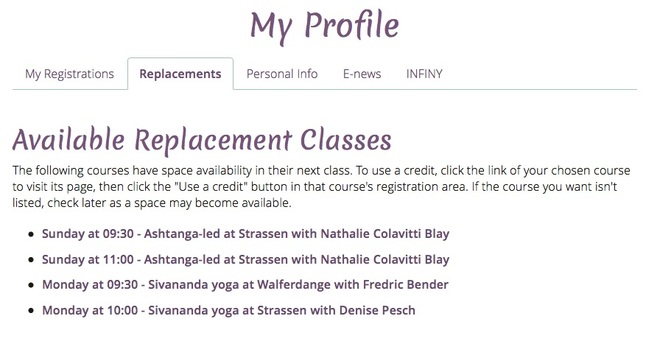
Click or tap the link to a class's course page to register as below.
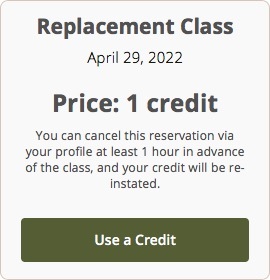
You can cancel the registration at least 1 hour before class time in My Registrations ▽ and get the credit back. Within 1 hour, the credit is lost.